

NusaSMS API v1.0
Scroll down for code samples, example requests and responses. Select a language for code samples from the tabs above or the mobile navigation menu.
Grab your APIKey on app.nusasms.com, on Account > User management menu.
Response
Success
HTTP Response Code, either 200, 201, 202 or 204 and
error=false on the json response is success request.
- 200: Request succeed
- 201: Request succeed and data saved/updated
- 204: Removal request succeed
Failed / Error
All neither 200, 201 nor 204 HTTP response code is failed response.
HTTP Status Code
- 401 or 403: Authentication failure
- 400: Invalid HTTP request parameter.
- 404: Not found
- 405: Method not allowed
- 422: Invalid parameter value / format
- 429: Rate limit
- 50X: Server Error
Response Content Type
- Set
Acceptheader totext/xmlorapplication/xmlto get XML response.
IP Whitelist
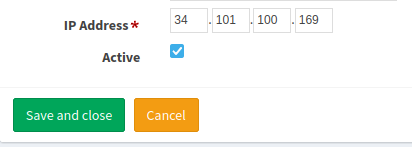
Follow this steps to register your IP Address.
- Login app.nusasms.com
- Go to Account menu then choose IP Whitelist menu.
- Click the add button (the blue button with plus icon)
- Fill the fields and make sure to check the Active mark.
- Click Save and close
Authentication
- API Key (APIKey)
- Parameter Name: APIKey, in: header.
APIKey
Get user data using API Key
GET /nusasms_api/1.0/auth/api_key
BASE_URL=https://api.nusasms.com
# BASE_URL=https://dev.nusasms.com    # For testing

curl ${BASE_URL}/nusasms_api/1.0/auth/api_key \
    -H "APIKey: {YOUR_APIKEY}" \
    -H 'Content-Type: application/json' \
#   --insecure     # Ignore SSL Verification
import requests

BASE_URL = "https://api.nusasms.com/nusasms_api/1.0"
# For testing
# BASE_URL = "https://dev.nusasms.com/nusasms_api/1.0"
HEADERS = {
    "Accept": "application/json",
    "APIKey": "{YOUR_API_KEY}"
}

r = requests.get(
    f'{BASE_URL}/auth/api_key',
    headers=HEADERS,
    # verify=False      # Skip SSL Verification
)

print(r.json())
package main

import (
    "fmt"
    "io/ioutil"
    "net/http"
)

func main() {
    headers := map[string][]string{
        "Accept": []string{"application/json"},
        "APIKey": []string{" YOUR_API_KEY "},
    }
    url := "https://api.nusasms.com/nusasms_api/1.0/auth/api_key"
    // For testing
    // url := "https://dev.nusasms.com/nusasms_api/1.0/auth/api_key"

    req, _ := http.NewRequest("GET", url, nil)
    req.Header = headers

    client := &http.Client{}
    resp, err := client.Do(req)

    if err != nil {
        panic(err)
    }

    body, _ := ioutil.ReadAll(resp.Body)

    fmt.Println(string(body))
    // ...
}
<?php
$BASE_URL = "https://api.nusasms.com/nusasms_api/1.0/auth/api_key";

$curl = curl_init();
curl_setopt_array($curl, array(
    CURLOPT_RETURNTRANSFER => 1,
    CURLOPT_HTTPHEADER => array(
        'APIKey: {YOUR_API_KEY}',
        'Content-Type: application/json'
    ),
    CURLOPT_URL => $BASE_URL,

    // CURLOPT_SSL_VERIFYPEER => 0,    // Skip SSL Verification
));

$resp = curl_exec($curl);
echo $resp;
curl_close($curl);
const axios = require('axios');

const headers = {
  'Accept':'application/json',
  'APIKey':'YOUR_API_KEY'
};
const url = 'https://api.nusasms.com/nusasms_api/1.0/auth/api_key'
// Test host
//const url = 'https://dev.nusasms.com/nusasms_api/1.0/auth/api_key'

axios.get(url, {headers: headers})
  .then(function(response) {
      console.log(response.data)
  })
  .catch(error => {
    if (error.response) {
      console.error(error.response.data)
    } else if (error.request) {
      console.error(error.request)
    } else {
      console.error(error.message);
    }
  });
require 'rest-client'
require 'json'

headers = {
    'Accept' => 'application/json',
    'APIKey' => 'YOUR_API_KEY'
}
url = 'https://api.nusasms.com/nusasms_api/1.0/auth/api_key'
# Dev host
# url = 'https://dev.nusasms.com/nusasms_api/1.0/auth/api_key'

result = RestClient.get(url, headers=headers)

puts JSON.parse(result)
Example responses
200 Response
{
  "error": false,
  "message": "Data message",
  "data": {
    "userid": "string",
    "idPerson": 0,
    "idClient": 0
  }
}
Responses
| Status | Meaning | Description | Schema |
|---|---|---|---|
| 200 | OK | Successful Response | PersonResponse |
WhatsApp Business
Introduction
Usage flow
- Register Whatsapp Official Account.
- Request for message template.
- Use any pre-approved template to send broadcast message (see Send Broadcast Message section below).
- After any recipient answer a broadcast message, you can send reply message to the recipient. (max: 24 hours after the recipient reply the broadcast messsage)
Rate Limit
- Gateway message request is limited to 60 requests / minute.
Type of Message
- Broadcast: send message using any approved template
- Reply: send message to a recipient whom has been answered broadcast message
- Interactive: send message to a recipient whom has been send you a message within 24 hours.
There are 3 types of interactive message- Button List: List of options to choose from (options are defined as rows in the request payload)
- Button Reply:
- Button URL:
Message Template
WhatsApp message templates allow businesses to use pre-approved templates to send structured messages to customers who have opted in to receive notifications.
Message template is devided in 4 parts:
-
Header: (Optional) Add a title or choose which type of media you’ll use for this header.
Valid types:- DOCUMENT:
doc,docx,pdf,ppt,pptx,txt,xlx, andxlsx
Max: 50 MB - IMAGE:
jpegandpng
Max: 5 MB - VIDEO:
mp4
Max: 15 MB - TEXT:
txt
Upon creation,
TEXTheader might have parameters (similar like on the Body)`. - DOCUMENT:
-
Body: Enter the text for your message in the language you’ve selected. You can edit text formats, add emojis or include variables. These allow a developer to add unique information such as specific names, locations or tracking numbers when inputting the templates into WhatsApp Business Platform.
-
Footer: (Optional) Add a short line of text to the bottom of your message template.
-
Buttons: (Optional) Select from the drop down menu to create buttons that let customers respond to your message or take action.
Type of buttons:- Call to action: Create up to 2 buttons that let your customers take action. The types of action include Call phone number and URL to Visit website. This lets you add a phone number or website URL to your message. If you choose Visit website, you can choose from a Static (fixed) website URL or a Dynamic website URL, which creates a personalized link for the customer to view their specific information on your website by adding a variable at the end of the link.
- Quick reply: Create up to 3 buttons that let your customers respond to your message.
Template creation limitation:
- Message template name field is limited to 512 characters.
- Message template content field is limited to 1024 characters.
Message Status
Message status for message is sent, delivered, read, and failed.
Send Broadcast Message
POST /nusasms_api/1.0/wa_business/broadcast
package main

import (
    "bytes"
    "encoding/json"
    "fmt"
    "io/ioutil"
    "net/http"
)

func main() {
    headers := map[string][]string {
        "Content-Type": []string{"application/json"},
        "Accept": []string{"application/json"},
        "APIKey": []string{"YOUR_API_KEY"},
    }

    param_header := map[string]string {
        "type": "image",
        "link": "https://link.to/yourimage.png",
    }
    param_body := []interface{} {
        map[string]string { "type": "text", "text": "your text" },
        map[string]string { "type": "text", "text": "your text again" },
    }
//     param_buttons := []interface{} {
//         map[string]interface{} {},
//     }
    payload, _ := json.Marshal(map[string]interface{} {
        "recipient": "DESTINATION_PHONE_NUMBER",
        "gateway_id": "PHONE_NUMBER_ID",
        "template": map[string]string {
        	"name": "TEMPLATE_NAME",
        	"language": "TEMPLATE_LANGUAGE_CODE",
        },
        "header": param_header,
        "body": param_body,
//         "bottons": param_buttons,
    })
    url := "https://api.nusasms.com/nusasms_api/1.0/wa_business/broadcast"

    req, err := http.NewRequest("POST", url, bytes.NewBuffer(payload))
    req.Header = headers

    client := &http.Client{}
    resp, err := client.Do(req)
    if err != nil {
        panic(err)
    }

    body, _ := ioutil.ReadAll(resp.Body)
    fmt.Println(string(body))
    // ...
}
const axios = require('axios');

const headers = {
  Accept: 'application/json',
  APIKey: 'YOUR_API_KEY'
};
var data = {
  gateway_id: "GATEWAY_ID",
  recipient: "RECIPIENT_ID",
  template: {
    language: "LANG_CODE",
    name: "TEMPLATE_NAME"
  },
  header: {
    type: "document",
    link: "https://link.to/your-document.pdf"
  },
  body: [
    { "type": "text", "text": "your text for param 1" },
    { "type": "text", "text": "your text for param 2" },
  ],
  buttons: [
    {
      sub_type: "QUICK_REPLY",
      index: 1,
      parameters: {
        type: "payload",
        payload: "PAYLOAD"
      }
    }
  ]
}

const URL = 'https://api.nusasms.com/nusasms_api/1.0/wa_business/broadcast'

axios.post(URL, data, {headers})
  .then(response => {
      console.log(response.data)
  })
  .catch(error => {
    if (error.response) {
      console.error(error.response.data)
    } else if (error.request) {
      console.error(error.request)
    } else {
      console.error(error.message);
    }
  });
<?php

$BASE_URL = 'https://api.nusasms.com/nusasms_api/1.0/wa_business/broadcast';

$curl = curl_init();
$payload = json_encode(array(
    'recipient' => 'RECIPIENT',
    'gateway_id' => 'GATEWAY_ID',
    'template' => array(
        'language' => 'LANG_CODE',
        'name' => 'TEMPLATE_NAME',
    ),
    'header' => array(
        array(
            "type" => "text",
            "text" => "Text for param 1 on header",
        ),
        array(
            "type" => "text",
            "text" => "Text for param 2 on header",
        )
    )
));

echo $payload . "\n";

curl_setopt_array($curl, array(
    CURLOPT_RETURNTRANSFER => 1,
    CURLOPT_URL => $BASE_URL,
    CURLOPT_POST => true,
    CURLOPT_HTTPHEADER => array(
        "APIKey: YOUR_API_KEY",
        'Content-Type: application/json'
    ),
    CURLOPT_POSTFIELDS => $payload,
    // CURLOPT_SSL_VERIFYPEER => 0,    // Skip SSL Verification
));

$resp = curl_exec($curl);
echo $resp;
import requests

BASE_URL = 'https://api.nusasms.com'
URL = f'{BASE_URL}/nusasms_api/1.0/wa_business/broadcast'
HEADERS = {"APIKey": "DEV_TESTING_API_KEY"}

PAYLOADS = {
  "recipient": "RECIPIENT",
  "gateway_id": "GATEWAY_ID",
  "template": {
    "language": "LANG_CODE",
    "name": "TEMPLATE_NAME"
  },
  "body": [
    { "type": "text", "text": "your text for param 1" },
    { "type": "text", "text": "your text for param 2" }
  ],
  "buttons": [
    {
      "sub_type": "QUICK_REPLY",
      "index": 1,
      "parameters": { "type": "payload", "payload": "PAYLOAD" }
    }
  ]
}
r = requests.post(URL, json=PAYLOADS, headers=HEADERS)
print(r.json())
require 'rest-client'
require 'json'
headers = {
'APIKey' => 'DEV_TESTING_API_KEY',
'Content-Type' => 'application/json'
}
payloads = {
'recipient' => 'RECIPIENT',
'gateway_id' => 'GATEWAY_ID',
'template': {
'language' => 'LANG_CODE',
'name' => 'TEMPLATE_NAME'
},
'body' => [
{
"type" => "text",
"text" => "Text for param 1 on body",
},
{
"type" => "text",
"text" => "Text for param 2 on body",
}
]
}
base_url = 'https://api.nusasms.com/nusasms_api/1.0'
response = RestClient::Request.new({
method: :post,
url: base_url + '/wa_business/broadcast',
payload: payloads.to_json,
headers: headers
}).execute do |response, request, result|
case response.code
# Success
when 201
[ :success, puts(response.to_str) ]
when 403
[
:error,
puts("Failed status_code=#{response.code} response=#{response.to_str}")
]
when 422
[
:error,
puts("Failed status_code=#{response.code} response=#{response.to_str}")
]
else
[
:error,
puts("Failed response=#{response.to_str}")
]
end
end
URL=https://api.nusasms.com/nusasms_api/1.0/wa_business/broadcast

curl -X 'POST' $URL \
  -H 'Accept: application/json' \
  -H 'APIKey: YOUR_API_KEY' \
  -H 'Content-Type: application/json' \
 -d '{
  "recipient": "RECIPIENT",
  "gateway_id": "GATEWAY_ID",
  "template": {
    "language": "LANG_CODE",
    "name": "TEMPLATE_NAME"
  },
  "body": [
    { "type": "text", "text": "your text for param 1" },
    { "type": "text", "text": "your text for param 2" }
  ],
  "buttons": [
    {
      "sub_type": "QUICK_REPLY",
      "index": 1,
      "parameters": { "type": "payload", "payload": "PAYLOAD" }
    }
  ]
}'
Broadcast message can be sent using pre-approved template. A template message parameters consists of message part, namely:
header: Add a title or choose which type of media.body: Text for your message in the language you’ve selected.buttons: Message button parameters.
Header
Media file is provided via header.
The media file types that are allowed are document, image and video.
Only one media header is allowed per message.
Apart from media you can have a message title that can use multiple text parameters.
Media (image, video and document)
Text
body
You can include multiple text parameters on the body upon requesting template.
buttons
There are 2 types of button on message template
- Action button: URL and Call button. Max 2 buttons per message.
If you use 2 buttons, its must be
URLandCallbutton. - Quick reply: text only button for quick reply. Max 3 buttons per message.
Actions
Action buttons parameter is only for dynamic URL Button.
The value of the parameter (text) is developer-provided suffix that is
appended to the predefined prefix URL in the template.
Quick Reply
Body parameter
{
  "recipient": "string",
  "gateway_id": "string",
  "template": {
    "name": "string",
    "language": "string"
  },
  "header": {
    "type": "image",
    "link": "http://example.com",
    "filename": "string"
  },
  "body": [
    {
      "type": "text",
      "text": "string"
    }
  ],
  "buttons": [
    {
      "sub_type": "QUICK_REPLY",
      "parameters": {
        "type": "payload",
        "payload": "string"
      },
      "index": 2
    }
  ],
  "message_id": "string"
}
Parameters
| Name | In | Type | Required | Description |
|---|---|---|---|---|
| body | body | TemplateParam | true | none |
Example responses
200 Response
{
  "error": false,
  "message": "Data message",
  "data": {
    "message_id": "string"
  }
}
Responses
| Status | Meaning | Description | Schema |
|---|---|---|---|
| 200 | OK | Successful Response | Response |
| 422 | Unprocessable Entity | Validation Error | HTTPValidationError |
Send Otp Message
POST /nusasms_api/1.0/wa_business/otp
package main

import (
    "bytes"
    "encoding/json"
    "fmt"
    "io/ioutil"
    "net/http"
)

func main() {
    headers := map[string][]string {
        "Content-Type": []string{"application/json"},
        "Accept": []string{"application/json"},
        "APIKey": []string{"YOUR_API_KEY"},
    }

    payload, _ := json.Marshal(map[string]interface{} {
        "recipient": "DESTINATION_PHONE_NUMBER",
        "gateway_id": "PHONE_NUMBER_ID",
        "otp": "YOUR OTP CODE",
        "template": []map[string]string {
          "name": "AUTHENTICATION_TEMPLATE_NAME",
          "language": "TEMPLATE_LANGUAGE_CODE",
        }
    })
    url := "https://api.nusasms.com/nusasms_api/1.0/wa_business/otp"

    req, err := http.NewRequest("POST", url, bytes.NewBuffer(payload))
    req.Header = headers

    client := &http.Client{}
    resp, err := client.Do(req)
    if err != nil {
        panic(err)
    }

    body, _ := ioutil.ReadAll(resp.Body)
    fmt.Println(string(body))
    // ...
}
const axios = require('axios');

const headers = {
  Accept: 'application/json',
  APIKey: 'YOUR_API_KEY'
};
var data = {
  gateway_id: "GATEWAY_ID",
  recipient: "RECIPIENT_ID",
  template: {
    name: "AUTH_TEMPLATE_NAME",
    language: "LANG_CODE",
  },
  otp: "YOUR OTP CODE"
}

const URL = 'https://api.nusasms.com/nusasms_api/1.0/wa_business/otp'

axios.post(URL, data, {headers})
  .then(response => {
      console.log(response.data)
  })
  .catch(error => {
    if (error.response) {
      console.error(error.response.data)
    } else if (error.request) {
      console.error(error.request)
    } else {
      console.error(error.message);
    }
  });
<?php

$BASE_URL = 'https://api.nusasms.com/nusasms_api/1.0/wa_business/otp';

$curl = curl_init();
$payload = json_encode(array(
    'recipient' => 'RECIPIENT',
    'gateway_id' => 'GATEWAY_ID',
    'template' => array(
      'name' => 'AUTHENTICATION_TEMPLATE_NAME',
      'language' => 'LANG_CODE',
    ),
    'otp' => 'Your OTP Code',
));

echo $payload . "\n";

curl_setopt_array($curl, array(
    CURLOPT_RETURNTRANSFER => 1,
    CURLOPT_URL => $BASE_URL,
    CURLOPT_POST => true,
    CURLOPT_HTTPHEADER => array(
        "APIKey: YOUR_API_KEY",
        'Content-Type: application/json'
    ),
    CURLOPT_POSTFIELDS => $payload,
    // CURLOPT_SSL_VERIFYPEER => 0,    // Skip SSL Verification
));

$resp = curl_exec($curl);
echo $resp;
import requests

BASE_URL = 'https://api.nusasms.com'
URL = f'{BASE_URL}/nusasms_api/1.0/wa_business/otp'
HEADERS = {"APIKey": "DEV_TESTING_API_KEY"}

PAYLOADS = {
  "recipient": "RECIPIENT",
  "gateway_id": "GATEWAY_ID",
  "template": {
    "name": "AUTHENTICATION_TEMPLATE_NAME",
    "language": "LANG_CODE",
  },
  "otp": "Your OTP Code"
}
r = requests.post(URL, json=PAYLOADS, headers=HEADERS)
print(r.json())
require 'rest-client'
require 'json'
headers = {
'APIKey' => 'DEV_TESTING_API_KEY',
'Content-Type' => 'application/json'
}
payloads = {
'recipient' => 'RECIPIENT',
'gateway_id' => 'GATEWAY_ID',
'template' => {
'name' => 'AUTHENTICATION_TEMPLATE_NAME',
'language' => 'LANG_CODE',
},
'otp' => 'Your OTP Code'
}
base_url = 'https://api.nusasms.com/nusasms_api/1.0'
response = RestClient::Request.new({
method: :post,
url: base_url + '/wa_business/otp',
payload: payloads.to_json,
headers: headers
}).execute do |response, request, result|
case response.code
# Success
when 201
[ :success, puts(response.to_str) ]
when 403
[
:error,
puts("Failed status_code=#{response.code} response=#{response.to_str}")
]
when 422
[
:error,
puts("Failed status_code=#{response.code} response=#{response.to_str}")
]
else
[
:error,
puts("Failed response=#{response.to_str}")
]
end
end
URL=https://api.nusasms.com/nusasms_api/1.0/wa_business/otp

curl -X 'POST' $URL \
  -H 'Accept: application/json' \
  -H 'APIKey: YOUR_API_KEY' \
  -H 'Content-Type: application/json' \
 -d '{
  "recipient": "RECIPIENT",
  "gateway_id": "GATEWAY_ID",
  "template": {
    "name": "AUTHENTICATION_TEMPLATE_NAME",
    "language": "LANG_CODE"
  },
  "otp": "Your OTP Code"
}'
Send OTP message
OTP message can be sent if you has a Authentication Template.
OTP Text requirements
- Max 15 Characters
- Can not contain any space character
Body parameter
{
  "recipient": "string",
  "gateway_id": "string",
  "otp": "string",
  "template": {
    "name": "string",
    "language": "string"
  }
}
Parameters
| Name | In | Type | Required | Description |
|---|---|---|---|---|
| body | body | OTPParameter | true | none |
Example responses
200 Response
{
  "error": false,
  "message": "Data message",
  "data": {
    "message_id": "string"
  }
}
Responses
| Status | Meaning | Description | Schema |
|---|---|---|---|
| 200 | OK | Successful Response | Response |
| 422 | Unprocessable Entity | Validation Error | HTTPValidationError |
Send Reply Message
POST /nusasms_api/1.0/wa_business/reply
package main

import (
    "bytes"
    "encoding/json"
    "fmt"
    "io/ioutil"
    "net/http"
)

func main() {
    headers := map[string][]string {
        "Content-Type": []string{"application/json"},
        "Accept": []string{"application/json"},
        "APIKey": []string{"YOUR_API_KEY"},
    }

    param_payloads := map[string]string {
        "body": "YOUR TEXT MESSAGE"
    }
    payload, _ := json.Marshal(map[string]interface{} {
        "recipient": "DESTINATION_PHONE_NUMBER",
        "gateway_id": "PHONE_NUMBER_ID",
        "type": "text",
        "payloads": param_payloads,
    })
    url := "https://api.nusasms.com/nusasms_api/1.0/wa_business/reply"

    req, err := http.NewRequest("POST", url, bytes.NewBuffer(payload))
    req.Header = headers

    client := &http.Client{}
    resp, err := client.Do(req)
    if err != nil {
        panic(err)
    }

    body, _ := ioutil.ReadAll(resp.Body)
    fmt.Println(string(body))
    // ...
}
const axios = require('axios');

const headers = {
  Accept: 'application/json',
  APIKey: 'YOUR_API_KEY'
};
var data = {
  gateway_id: "GATEWAY_ID",
  recipient: "RECIPIENT_ID",
  type: "text",
  payloads: {
    body: "YOUR TEXT MESSAGE HERE"
  }
}

const URL = 'https://api.nusasms.com/nusasms_api/1.0/wa_business/reply'

axios.post(URL, data, {headers})
  .then(response => {
      console.log(response.data)
  })
  .catch(error => {
    if (error.response) {
      console.error(error.response.data)
    } else if (error.request) {
      console.error(error.request)
    } else {
      console.error(error.message);
    }
  });
<?php

$BASE_URL = 'https://api.nusasms.com/nusasms_api/1.0/wa_business/reply';

$curl = curl_init();
$payload = json_encode(array(
    'recipient' => 'RECIPIENT',
    'gateway_id' => 'GATEWAY_ID',
    'type' => 'text',
    'payloads' => array(
      'body' => 'YOUR TEXT MESSAGE HERE'
    )
));

echo $payload . "\n";

curl_setopt_array($curl, array(
    CURLOPT_RETURNTRANSFER => 1,
    CURLOPT_URL => $BASE_URL,
    CURLOPT_POST => true,
    CURLOPT_HTTPHEADER => array(
        "APIKey: YOUR_API_KEY",
        'Content-Type: application/json'
    ),
    CURLOPT_POSTFIELDS => $payload,
    // CURLOPT_SSL_VERIFYPEER => 0,    // Skip SSL Verification
));

$resp = curl_exec($curl);
echo $resp;
import requests

BASE_URL = 'https://api.nusasms.com'
URL = f'{BASE_URL}/nusasms_api/1.0/wa_business/reply'
HEADERS = {"APIKey": "DEV_TESTING_API_KEY"}

PAYLOADS = {
  "recipient": "RECIPIENT",
  "gateway_id": "GATEWAY_ID",
  "type": "text",
  "payloads": {
      "body": "YOUR TEXT MESSAGE HERE"
  }
}
r = requests.post(URL, json=PAYLOADS, headers=HEADERS)
print(r.json())
require 'rest-client'
require 'json'
headers = {
'APIKey' => 'DEV_TESTING_API_KEY',
'Content-Type' => 'application/json'
}
payloads = {
'recipient' => 'RECIPIENT',
'gateway_id' => 'GATEWAY_ID',
'type' => 'text',
'payloads': {
'body' => 'YOUR TEXT MESSAGE HERE',
},
}
base_url = 'https://api.nusasms.com/nusasms_api/1.0'
response = RestClient::Request.new({
method: :post,
url: base_url + '/wa_business/reply',
payload: payloads.to_json,
headers: headers
}).execute do |response, request, result|
case response.code
# Success
when 201
[ :success, puts(response.to_str) ]
when 403
[
:error,
puts("Failed status_code=#{response.code} response=#{response.to_str}")
]
when 422
[
:error,
puts("Failed status_code=#{response.code} response=#{response.to_str}")
]
else
[
:error,
puts("Failed response=#{response.to_str}")
]
end
end
URL=https://api.nusasms.com/nusasms_api/1.0/wa_business/reply

curl -X 'POST' $URL \
  -H 'Accept: application/json' \
  -H 'APIKey: YOUR_API_KEY' \
  -H 'Content-Type: application/json' \
 -d '{
  "recipient": "RECIPIENT",
  "gateway_id": "GATEWAY_ID",
  "type": "text",
  "payloads": {
    "body": "YOUR TEXT MESSAGE HERE"
  }
}'
Text
Document
| Type | Extensions | MIME Type | Max Size |
|---|---|---|---|
| JPEG | .jpeg, jpg |
image/jpeg | 5 MB |
| PNG | .png |
image/png | 5 MB |
Preview
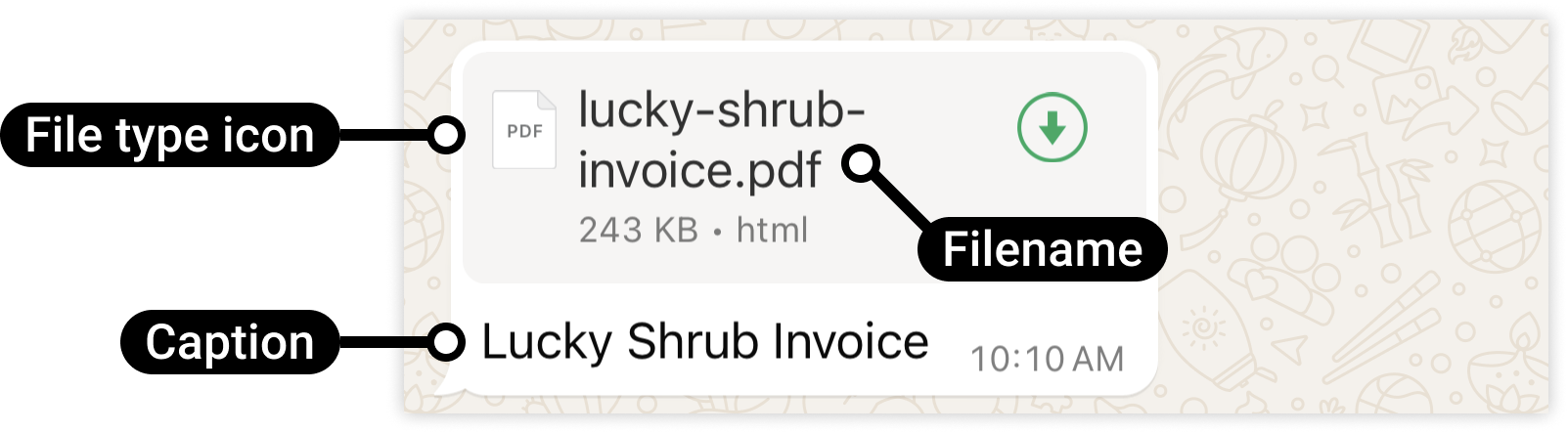
Image
| Type | Extension | Max Size | MIME Type |
|---|---|---|---|
| Text | .txt |
100 MB | text/plain |
| Microsoft Excel | .xls |
100 MB | application/vnd.ms-excel |
| Microsoft Excel | .xlsx |
100 MB | application/vnd.openxmlformats-officedocument.spreadsheetml.sheet |
| Microsoft Word | .doc |
100 MB | application/msword |
| Microsoft Word | .docx |
100 MB | application/vnd.openxmlformats-officedocument.wordprocessingml.document |
| Microsoft PowerPoint | .ppt |
100 MB | application/vnd.ms-powerpoint |
| Microsoft PowerPoint | .pptx |
100 MB | application/vnd.openxmlformats-officedocument.presentationml.presentation |
.pdf |
100 MB | application/pdf |
Video
| Type | Extensions | MIME Type | Max Size |
|---|---|---|---|
| 3GPP | .3gp |
vide/3gpp | 16 MB |
| MP4 Video | .mp4 |
video/mp4 | 5 MB |
Body parameter
{
  "recipient": "string",
  "gateway_id": "string",
  "type": "document",
  "payloads": {
    "id": "string",
    "link": "http://example.com",
    "caption": "string",
    "filename": "string"
  }
}
Parameters
| Name | In | Type | Required | Description |
|---|---|---|---|---|
| body | body | any | true | none |
Example responses
200 Response
{
  "error": false,
  "message": "Data message",
  "data": {
    "message_id": "string"
  }
}
Responses
| Status | Meaning | Description | Schema |
|---|---|---|---|
| 200 | OK | Successful Response | Response |
| 422 | Unprocessable Entity | Validation Error | HTTPValidationError |
Send Interactive Button List
POST /nusasms_api/1.0/wa_business/interactive/button_list
package main

import (
	"bytes"
	"encoding/json"
	"io"
	"net/http"
	"log"
)

type Row struct {
	ButtonID    string `json:"button_id"`
	Title       string `json:"title"`
	Description string `json:"description,omitempty"`
}

type Section struct {
	Title string `json:"title"`
	Rows  []Row  `json:"rows"`
}

type TextBlock struct {
	Text string `json:"text"`
}

type Action struct {
	Text     string    `json:"text"`
	Sections []Section `json:"sections"`
}

type Payload struct {
	GatewayID string    `json:"gateway_id"`
	Recipient string    `json:"recipient"`
	Header    TextBlock `json:"header"`
	Body      TextBlock `json:"body"`
	Footer    TextBlock `json:"footer"`
	Action    Action    `json:"action"`
}

func sendMessage(url, apiKey string) error {
	payload := Payload{
		GatewayID: "YOUR_GATEWAY_ID",
		Recipient: "YOUR_RECIPIENT",
		Header: TextBlock{
			Text: "Header Title",
		},
		Body: TextBlock{
			Text: "Text body here. This section is required (max 4096 chars)",
		},
		Footer: TextBlock{
			Text: "Footer text",
		},
		Action: Action{
			Text: "Button List Title",
			Sections: []Section{
				{
					Title: "First Section",
					Rows: []Row{
						{
							ButtonID:    "btn_id_1",
							Title:       "First item",
							Description: "This section item description",
						},
						{
							ButtonID:    "btn_id_2",
							Title:       "Second item",
							Description: "This description is optional",
						},
					},
				},
				{
					Title: "Second Section",
					Rows: []Row{
						{
							ButtonID: "btn_id_3",
							Title:    "First item",
						},
					},
				},
			},
		},
	}

	// Marshal payload to JSON
	body, err := json.Marshal(payload)
	if err != nil {
		return err
	}
	// Create HTTP POST request
	req, err := http.NewRequest("POST", url, bytes.NewBuffer(body))
	if err != nil {
		return err
	}
	// Set headers
	req.Header.Set("Accept", "application/json")
	req.Header.Set("APIKey", apiKey)
	req.Header.Set("Content-Type", "application/json")

	// Send request
	client := &http.Client{}
	resp, err := client.Do(req)
	if err != nil {
		return err
	}
	defer resp.Body.Close()

	// Read response
	respBody, err := io.ReadAll(resp.Body)
	if err != nil {
		return err
	}

	log.Printf("Status: %d\n", resp.StatusCode)
	log.Printf("Response: %s\n", string(respBody))

	return nil
}

func main() {
	url := "https://api.nusasms.com/nusasms_api/1.0/wa_business/interactive/button_list"
	apiKey := "YOUR_API_KEY"

	if err := sendMessage(url, apiKey); err != nil {
		log.Fatalf("Error: %v", err)
	}
}
const axios = require('axios');

// Define the payload object
const payload = {
  gateway_id: 'YOUR_GATEWAY_ID',
  recipient: 'YOUR_RECIPIENT',
  header: {
    text: 'Header Title'
  },
  body: {
    text: 'Text body here. This section is required (max 4096 chars)'
  },
  footer: {
    text: 'Footer text'
  },
  action: {
    text: 'Button List Title',
    sections: [
      {
        title: 'First Section',
        rows: [
          {
            button_id: 'btn_id_1',
            title: 'First item',
            description: 'This section item description'
          },
          {
            button_id: 'btn_id_2',
            title: 'Second item',
            description: 'This description is optional'
          }
        ]
      },
      {
        title: 'Second Section',
        rows: [
          {
            button_id: 'btn_id_3',
            title: 'First item'
          }
        ]
      }
    ]
  }
};

async function sendMessage(url, apiKey) {
  try {
    const response = await axios.post(url, payload, {
      headers: {
        'Accept': 'application/json',
        'APIKey': apiKey,
        'Content-Type': 'application/json'
      }
    });

    console.log('Status:', response.status);
    console.log('Response:', JSON.stringify(response.data, null, 2));
    return response.data;
  } catch (error) {
    if (error.response) {
      // Server responded with error status
      console.error('Status:', error.response.status);
      console.error('Response:', error.response.data);
    } else if (error.request) {
      // Request was made but no response received
      console.error('No response received:', error.message);
    } else {
      // Error setting up the request
      console.error('Error:', error.message);
    }
    throw error;
  }
}

const url = 'https://api.nusasms.com/nusasms_api/1.0/wa_business/interactive/button_list';
const apiKey = 'YOUR_API_KEY';

sendMessage(url, apiKey)
  .then(() => console.log('Message sent successfully'))
  .catch((error) => process.exit(1));
<?php

function sendMessage($url, $apiKey) {
    // Define the payload
    $payload = [
        'gateway_id' => 'YOUR_GATEWAY_ID',
        'recipient' => 'YOUR_RECIPIENT',
        'header' => [
            'text' => 'Header Title'
        ],
        'body' => [
            'text' => 'Text body here. This section is required (max 4096 chars)'
        ],
        'footer' => [
            'text' => 'Footer text'
        ],
        'action' => [
            'text' => 'Button List Title',
            'sections' => [
                [
                    'title' => 'First Section',
                    'rows' => [
                        [
                            'button_id' => 'btn_id_1',
                            'title' => 'First item',
                            'description' => 'This section item description'
                        ],
                        [
                            'button_id' => 'btn_id_2',
                            'title' => 'Second item',
                            'description' => 'This description is optional'
                        ]
                    ]
                ],
                [
                    'title' => 'Second Section',
                    'rows' => [
                        [
                            'button_id' => 'btn_id_3',
                            'title' => 'First item'
                        ]
                    ]
                ]
            ]
        ]
    ];

    // Initialize curl session
    $curl = curl_init();

    // Set curl options
    curl_setopt($curl, CURLOPT_URL, $url);
    curl_setopt($curl, CURLOPT_RETURNTRANSFER, true);
    curl_setopt($curl, CURLOPT_POST, true);
    curl_setopt($curl, CURLOPT_POSTFIELDS, json_encode($payload));

    // Set headers
    curl_setopt($curl, CURLOPT_HTTPHEADER, [
        'Accept: application/json',
        'APIKey: ' . $apiKey,
        'Content-Type: application/json'
    ]);

    // Execute request
    $response = curl_exec($curl);
    $statusCode = curl_getinfo($curl, CURLINFO_HTTP_CODE);
    $curlError = curl_error($curl);

    // Close curl session
    curl_close($curl);

    // Handle errors
    if ($curlError) {
        throw new Exception('Curl error: ' . $curlError);
    }

    // Log and return
    echo "Status Code: " . $statusCode . "\n";
    echo "Response: " . $response . "\n";

    return json_decode($response, true);
}

// Main execution
$url = 'https://api.nusasms.com/nusasms_api/1.0/wa_business/interactive/button_list';
$apiKey = 'YOUR_API_KEY';

try {
    $result = sendMessage($url, $apiKey);
    echo "Success!\n";
} catch (Exception $e) {
    echo "Error: " . $e->getMessage() . "\n";
    exit(1);
}
import requests
import json

def send_message(url, api_key):
    payload = {
        "gateway_id": "YOUR_GATEWAY_ID",
        "recipient": "YOUR_RECIPIENT",
        "header": {
            "text": "Header Title"
        },
        "body": {
            "text": "Text body here. This section is required (max 4096 chars)"
        },
        "footer": {
            "text": "Footer text"
        },
        "action": {
            "text": "Button List Title",
            "sections": [
                {
                    "title": "First Section",
                    "rows": [
                        {
                            "button_id": "btn_id_1",
                            "title": "First item",
                            "description": "This section item description"
                        },
                        {
                            "button_id": "btn_id_2",
                            "title": "Second item",
                            "description": "This description is optional"
                        }
                    ]
                },
                {
                    "title": "Second Section",
                    "rows": [
                        {
                            "button_id": "btn_id_3",
                            "title": "First item"
                        }
                    ]
                }
            ]
        }
    }

    headers = {
        "Accept": "application/json",
        "APIKey": api_key,
        "Content-Type": "application/json"
    }

    try:
        response = requests.post(url, json=payload, headers=headers, timeout=10)

        # Raise exception for bad status codes (4xx, 5xx)
        response.raise_for_status()

        print(f"Status Code: {response.status_code}")
        print(f"Response: {json.dumps(response.json(), indent=2)}")
    except requests.exceptions.Timeout:
        print("Error: Request timed out")
        raise
    except requests.exceptions.ConnectionError:
        print("Error: Failed to connect to the server")
        raise
    except requests.exceptions.HTTPError as e:
        print(f"HTTP Error {e.response.status_code}: {e.response.text}")
        raise
    except requests.exceptions.RequestException as e:
        print(f"Error: {e}")
        raise

# Main execution
if __name__ == "__main__":
    url = "https://api.nusasms.com/nusasms_api/1.0/wa_business/interactive/button_list"
    api_key = "YOUR_API_KEY"

    send_message(url, api_key)
require 'rest-client'
require 'json'

def send_message(url, api_key)
  payload = {
    gateway_id: 'YOUR_GATEWAY_ID',
    recipient: 'YOUR_RECIPIENT',
    header: {
      text: 'Header Title'
    },
    body: {
      text: 'Text body here. This section is required (max 4096 chars)'
    },
    footer: {
      text: 'Footer text'
    },
    action: {
      text: 'Button List Title',
      sections: [
        {
          title: 'First Section',
          rows: [
            {
              button_id: 'btn_id_1',
              title: 'First item',
              description: 'This section item description'
            },
            {
              button_id: 'btn_id_2',
              title: 'Second item',
              description: 'This description is optional'
            }
          ]
        },
        {
          title: 'Second Section',
          rows: [
            {
              button_id: 'btn_id_3',
              title: 'First item'
            }
          ]
        }
      ]
    }
  }

  headers = {
    'Accept' => 'application/json',
    'APIKey' => api_key,
    'Content-Type' => 'application/json'
  }

  begin
    response = RestClient.post(
      url,
      payload.to_json,
      headers
    )

    puts "Status Code: #{response.code}"
    puts "Response: #{JSON.pretty_generate(JSON.parse(response.body))}"

    JSON.parse(response.body)

  rescue RestClient::ExceptionWithResponse => e
    puts "HTTP Error #{e.http_code}: #{e.response.body}"
    raise
  rescue RestClient::RequestTimeout
    puts "Error: Request timed out"
    raise
  rescue RestClient::ConnectionFailed => e
    puts "Error: Connection failed - #{e.message}"
    raise
  rescue => e
    puts "Error: #{e.message}"
    raise
  end
end

# Main execution
if __name__ == $0
  url = 'https://api.nusasms.com/nusasms_api/1.0/wa_business/interactive/button_list'
  api_key = 'YOUR_API_KEY'

  begin
    result = send_message(url, api_key)
    puts "✓ Message sent"
  rescue => e
    puts "✗ Failed to send message"
    exit 1
  end
end
URL=https://api.nusasms.com/nusasms_api/1.0/wa_business/interactive/button_list

curl -X 'POST' $URL \
  -H 'Accept: application/json' \
  -H 'APIKey: YOUR_API_KEY' \
  -H 'Content-Type: application/json' \
 -d '{
  "gateway_id": "YOUR_GATEWAY_ID",
  "recipient": "YOUR_RECIPIENT",
  "header": {
    "text": "Header Title"
  },
  "body": {
    "text": "Text body here. This section is required (max 4096 chars)"
  },
  "footer": {
    "text": "Footer text"
  },
  "action": {
    "text": "Button List Title",
    "sections": [
      {
        "title": "First Section",
        "rows": [
          {
            "button_id": "btn_id_1",
            "title": "First item",
            "description": "This section item description"
          },
          {
            "button_id": "btn_id_2",
            "title": "Second item",
            "description": "This description is optional"
          }
        ]
      },
      {
        "title": "Second Section",
        "rows": [
          {
            "button_id": "btn_id_3",
            "title": "First item"
          }
        ]
      }
    ]
  }
}'
Interactive button list message allow you to present WhatsApp users with a list of options to choose from (options are defined as rows in the request payload):
Message preview
The Interactive Message
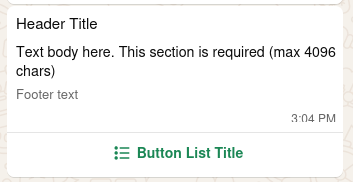
Show Button List
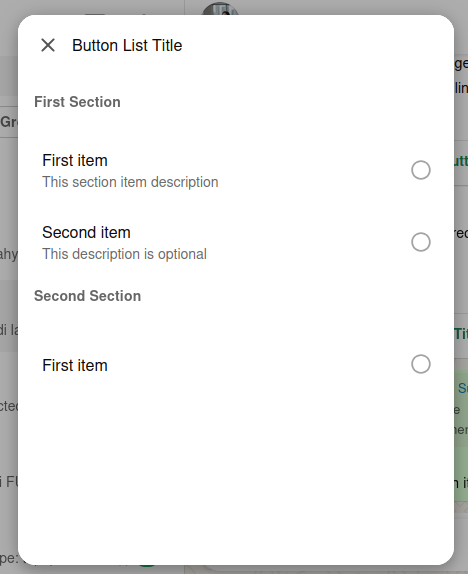
Send a choice
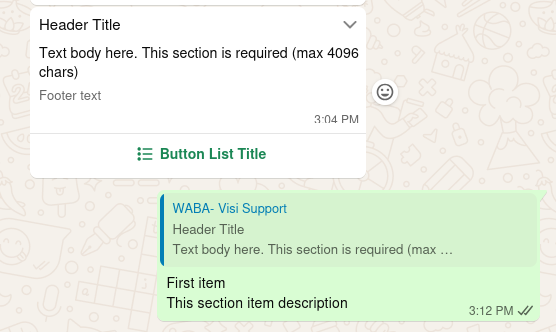
Json Request Components
header: Header title text
optional, max 60 charactersbody: Message text body
required, max 4069 charactersfooter: Foot note message
optional, max 60 charactersaction: The button list
The buttons can be grouped into sections,
actionconsist of max 10 sections, with 10 rows for all section combined
button_id
button_id is a identifier of the buttons.
Every button’s button_id should be unique.
This useful when use subscribe Push Inbox (webhook / callback),
which the selected button_id will be shown on the webhook call request data.
Body parameter
{
  "recipient": "string",
  "gateway_id": "string",
  "header": {
    "text": "string"
  },
  "body": {
    "text": "string"
  },
  "footer": {
    "text": "string"
  },
  "action": {
    "text": "string",
    "sections": [
      {
        "title": "string",
        "rows": [
          {
            "button_id": "string",
            "title": "string",
            "description": "string"
          }
        ]
      }
    ]
  }
}
Parameters
| Name | In | Type | Required | Description |
|---|---|---|---|---|
| body | body | ListButtonsParameters | true | none |
Example responses
200 Response
{
  "error": false,
  "message": "Data message",
  "data": {
    "message_id": "string"
  }
}
Responses
| Status | Meaning | Description | Schema |
|---|---|---|---|
| 200 | OK | Successful Response | Response |
| 422 | Unprocessable Entity | Validation Error | HTTPValidationError |
Send Interactive Button Reply
POST /nusasms_api/1.0/wa_business/interactive/button_reply
package main

import (
	"bytes"
	"encoding/json"
	"fmt"
	"io"
	"net/http"
)

func main() {
	payload := map[string]interface{}{
		"gateway_id": "<YOUR_GATEWAY_ID>",
		"recipient":  "<YOUR_RECIPIENT>",
		"header": map[string]interface{}{
			"type": "image",
			"link": "https://api-doc.nusasms.com/slate/img/logo.png",
		},
		"body": map[string]interface{}{
			"text": "This is the main text.\nMake it sounds cool\n😁",
		},
		"footer": map[string]interface{}{
			"text": "A little note on the footer",
		},
		"buttons": []map[string]string{
			{"button_id": "btn-id-1", "title": "This is"},
			{"button_id": "btn-id-2", "title": "some"},
			{"button_id": "btn-id-3", "title": "cool buttons"},
		},
	}

	jsonData, err := json.Marshal(payload)
	if err != nil {
		panic(err)
	}

	// Create HTTP request
	req, err := http.NewRequest("POST",
		"https://api.nusasms.com/nusasms_api/1.0/wa_business/interactive/button_reply",
		bytes.NewBuffer(jsonData),
	)
	if err != nil {
		panic(err)
	}
	// Set headers
	req.Header.Set("APIKey", "<YOUR_API_KEY>")
	req.Header.Set("Content-Type", "application/json")

	// Send request
	client := &http.Client{}
	resp, err := client.Do(req)
	if err != nil {
		panic(err)
	}
	defer resp.Body.Close()

	// Read response
	body, err := io.ReadAll(resp.Body)
	if err != nil {
		panic(err)
	}

	fmt.Printf("Status: %d\n", resp.StatusCode)
	fmt.Printf("Response: %s\n", string(body))
}
const axios = require('axios');

async function sendWhatsAppButton() {
  const payload = {
    gateway_id: '<YOUR_GATEWAY_ID>',
    recipient: '<YOUR_RECIPIENT>',
    header: {
      type: 'image',
      link: 'https://api-doc.nusasms.com/slate/img/logo.png',
    },
    body: { text: 'This is the main text.\nMake it sounds cool\n😁', },
    footer: { text: 'A little note on the footer' },
    buttons: [
      { button_id: 'btn-id-1', title: 'This is' },
      { button_id: 'btn-id-2', title: 'some' },
      { button_id: 'btn-id-3', title: 'cool buttons' },
    ],
  };

  try {
    const response = await axios.post(
      'https://api.nusasms.com/nusasms_api/1.0/wa_business/interactive/button_reply',
      payload,
      {
        headers: { 'APIKey': '<YOUR_API_KEY>', 'Content-Type': 'application/json' },
      }
    );

    console.log('Status:', response.status);
    console.log('Response:', response.data);
  } catch (error) {
    console.error('Error:', error.message);
  }
}

sendWhatsAppButton();
<?php

function sendWhatsAppButton() {
  $url = 'https://api.nusasms.com/nusasms_api/1.0/wa_business/interactive/button_reply';

  $payload = [
    'gateway_id' => '<YOUR_GATEWAY_ID>',
    'recipient' => '<YOUR_RECIPIENT>',
    'header' => [
      'type' => 'image',
      'link' => 'https://api-doc.nusasms.com/slate/img/logo.png',
    ],
    'body' => [
      'text' => "This is the main text.\nMake it sounds cool\n😁",
    ],
    'footer' => [
      'text' => 'A little note on the footer',
    ],
    'buttons' => [
      [
        'button_id' => 'btn-id-1',
        'title' => 'This is',
      ],
      [
        'button_id' => 'btn-id-2',
        'title' => 'some',
      ],
      [
        'button_id' => 'btn-id-3',
        'title' => 'cool buttons',
      ],
    ],
  ];

  // Initialize cURL
  $ch = curl_init($url);

  // Set cURL options
  curl_setopt($ch, CURLOPT_RETURNTRANSFER, true);
  curl_setopt($ch, CURLOPT_POST, true);
  curl_setopt($ch, CURLOPT_POSTFIELDS, json_encode($payload));
  curl_setopt($ch, CURLOPT_HTTPHEADER, [
    'APIKey: <YOUR_API_KEY>',
    'Content-Type: application/json',
  ]);

  // Execute request
  $response = curl_exec($ch);
  $httpCode = curl_getinfo($ch, CURLINFO_HTTP_CODE);
  $error = curl_error($ch);

  // Close cURL
  curl_close($ch);

  // Handle response
  if ($error) {
    echo "cURL Error: $error\n";
    return false;
  }

  echo "Status: $httpCode\n";
  echo "Response: $response\n";

  return true;
}

sendWhatsAppButton();
?>
import requests

def send_whatsapp_button():
    url = 'https://api.nusasms.com/nusasms_api/1.0/wa_business/interactive/button_reply'

    payload = {
        'gateway_id': '<YOUR_GATEWAY_ID>',
        'recipient': '<YOUR_RECIPIENT>',
        'header': {
            'type': 'image',
            'link': 'https://api-doc.nusasms.com/slate/img/logo.png',
        },
        'body': {'text': 'This is the main text.\nMake it sounds cool\n😁'},
        'footer': {'text': 'A little note on the footer'},
        'buttons': [
            {'button_id': 'btn-id-1', 'title': 'This is'},
            {'button_id': 'btn-id-2', 'title': 'some'},
            {'button_id': 'btn-id-3', 'title': 'cool buttons'},
        ],
    }
    headers = {
        'APIKey': '<YOUR_API_KEY>',
        'Content-Type': 'application/json',
    }
    response = requests.post(url, json=payload, headers=headers)
    print(f'Status: {response.status_code}')
    print(f'Response: {response.json()}')

if __name__ == '__main__':
    send_whatsapp_button()
require 'rest-client'
require 'json'

def send_whatsapp_button
  url = 'https://api.nusasms.com/nusasms_api/1.0/wa_business/interactive/button_reply'

  payload = {
    gateway_id: '<YOUR_GATEWAY_ID>',
    recipient: '<YOUR_RECIPIENT>',
    header: {
      type: 'image',
      link: 'https://api-doc.nusasms.com/slate/img/logo.png'
    },
    body: {text: "This is the main text.\nMake it sounds cool\n😁"},
    footer: {text: 'A little note on the footer'},
    buttons: [
      {button_id: 'btn-id-1', title: 'This is'},
      {button_id: 'btn-id-2', title: 'some'},
      {button_id: 'btn-id-3', title: 'cool buttons'}
    ]
  }

  headers = {
    APIKey: '<YOUR_API_KEY>',
    'Content-Type': 'application/json'
  }

  begin
    response = RestClient.post(url, payload.to_json, headers)
    puts "Status: #{response.code}"
    puts "Response: #{response.body}"
  rescue => e
    puts "Error: #{e.message}"
  end
end

send_whatsapp_button
URL=https://api.nusasms.com/nusasms_api/1.0/wa_business/interactive/button_reply

curl -X POST $URL \
    --header 'APIKey: <YOUR_API_KEY>' \
    --header 'Content-Type: application/json' \
    --data '{
    "gateway_id": "<YOUR_GATEWAY_ID>",
    "recipient": "<YOUR_RECIPIENT>",
    "header": {
        "type": "image",
        "link": "https://api-doc.nusasms.com/slate/img/logo.png"
    },
    "body": {
        "text": "This is the main text.\nMake it sounds cool\n😁"
    },
    "footer": {
        "text": "A little note on the footer"
    },
    "buttons": [
        {
            "button_id": "btn-id-1",
            "title": "This is"
        },
        {
            "button_id": "btn-id-2",
            "title": "some"
        },
        {
            "button_id": "btn-id-3",
            "title": "cool buttons"
        }
    ]
}'
Interactive Button Reply message allow you to send up to three predefined replies for users to choose from.
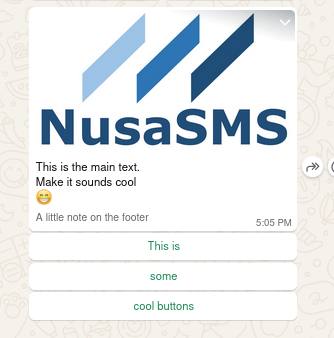
Clicked button
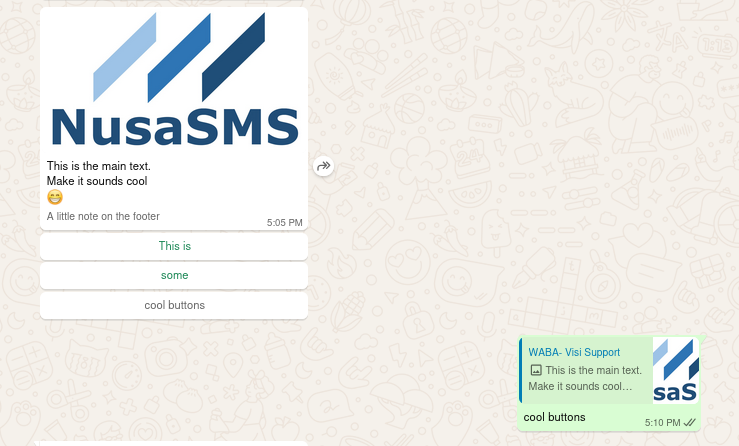
Json Request Components
-
header: Available types:text,document,image, andvideo
optional
Example:text:{"type": "text", "text": "Your Text Header"}document:{"type": "document", "link": "<DOCUMENT URL>"}image:{"type": "image", "link": "<IMAGE URL>"}video:{"type": "video", "link": "<VIDEO URL>"}
Media extensions
document:pdf,doc,docs,ppt,pptx,txt,xlsandxlsximage:jpegandpngimage:3gpandmp4
-
body: Message text body
required, max 1024 characters -
footer: Foot note message
optional, max 60 characters -
buttons: Reply buttons
max 3 itemsbutton_id: the button identifier. Must be unique.
max 256 characterstitle: Button label text.
max 20 characters
Body parameter
{
  "recipient": "string",
  "gateway_id": "string",
  "header": {
    "type": "document",
    "link": "http://example.com",
    "text": "string"
  },
  "body": {
    "text": "string"
  },
  "footer": {
    "text": "string"
  },
  "buttons": [
    {
      "button_id": "string",
      "title": "string"
    }
  ]
}
Parameters
| Name | In | Type | Required | Description |
|---|---|---|---|---|
| body | body | ReplyButtonParameters | true | none |
Example responses
200 Response
{
  "error": false,
  "message": "Data message",
  "data": {
    "message_id": "string"
  }
}
Responses
| Status | Meaning | Description | Schema |
|---|---|---|---|
| 200 | OK | Successful Response | Response |
| 422 | Unprocessable Entity | Validation Error | HTTPValidationError |
Send Interactive Button Url
POST /nusasms_api/1.0/wa_business/interactive/button_url
package main

import (
	"bytes"
	"fmt"
	"io"
	"net/http"
)

func main() {
	url := "https://api.nusasms.com/nusasms_api/1.0/wa_business/interactive/button_url"

	payload := `{
  "gateway_id": "<GATEWAY_ID>",
  "recipient": "<RECIPIENT_NUMBER>",
  "header": {
    "type": "image",
    "link": "https://api-doc.nusasms.com/slate/img/logo.png"
  },
  "body": {
    "text": "Tab button below if you wish to access the documentation"
  },
  "footer": {"text": "Happy coding"},
  "button": {
    "text": "API Documentation",
    "url": "https://api-doc.nusasms.com"
  }
}`

	req, _ := http.NewRequest("POST", url, bytes.NewBuffer([]byte(payload)))
	req.Header.Set("APIKey", "<YOUR_API_KEY>")
	req.Header.Set("Content-Type", "application/json")

	res, _ := http.DefaultClient.Do(req)
	body, _ := io.ReadAll(res.Body)
	defer res.Body.Close()

	fmt.Println(string(body))
}
const axios = require('axios');

const url = 'https://api.nusasms.com/nusasms_api/1.0/wa_business/interactive/button_url';

const payload = {
  gateway_id: '<GATEWAY_ID>',
  recipient: '<RECIPIENT_NUMBER>',
  header: {
    type: 'image',
    link: 'https://api-doc.nusasms.com/slate/img/logo.png'
  },
  body: {
    text: 'Tab button below if you wish to access the documentation'
  },
  footer: { text: 'Happy coding' },
  button: {
    text: 'API Documentation',
    url: 'https://api-doc.nusasms.com'
  }
};

const config = {
  headers: {
    'APIKey': '<YOUR_API_KEY>',
    'Content-Type': 'application/json'
  }
};

axios.post(url, payload, config)
  .then(res => console.log(res.data))
  .catch(err => console.error(err.response?.data || err.message));
<?php

$url = 'https://api.nusasms.com/nusasms_api/1.0/wa_business/interactive/button_url';

$payload = json_encode([
  'gateway_id' => '<GATEWAY_ID>',
  'recipient' => '<RECIPIENT_NUMBER>',
  'header' => [
    'type' => 'image',
    'link' => 'https://api-doc.nusasms.com/slate/img/logo.png'
  ],
  'body' => [
    'text' => 'Tab button below if you wish to access the documentation'
  ],
  'footer' => ['text' => 'Happy coding'],
  'button' => [
    'text' => 'API Documentation',
    'url' => 'https://api-doc.nusasms.com'
  ]
]);

$ch = curl_init($url);
curl_setopt($ch, CURLOPT_POST, 1);
curl_setopt($ch, CURLOPT_POSTFIELDS, $payload);
curl_setopt($ch, CURLOPT_HTTPHEADER, [
  'APIKey: <YOUR_API_KEY>',
  'Content-Type: application/json'
]);
curl_setopt($ch, CURLOPT_RETURNTRANSFER, true);

$response = curl_exec($ch);
$http_code = curl_getinfo($ch, CURLINFO_HTTP_CODE);
curl_close($ch);

echo "Status: $http_code\n";
echo "Response: $response\n";
?>
import requests

url = 'https://api.nusasms.com/nusasms_api/1.0/wa_business/interactive/button_url'

payload = {
    'gateway_id': '<GATEWAY_ID>',
    'recipient': '<RECIPIENT_NUMBER>',
    'header': {
        'type': 'image',
        'link': 'https://api-doc.nusasms.com/slate/img/logo.png'
    },
    'body': {
        'text': 'Tab button below if you wish to access the documentation'
    },
    'footer': {'text': 'Happy coding'},
    'button': {
        'text': 'API Documentation',
        'url': 'https://api-doc.nusasms.com'
    }
}

headers = {
    'APIKey': '<YOUR_API_KEY>',
    'Content-Type': 'application/json'
}

response = requests.post(url, json=payload, headers=headers)
print(f'Status: {response.status_code}')
print(f'Response: {response.text}')
require 'rest-client'
require 'json'

url = 'https://api.nusasms.com/nusasms_api/1.0/wa_business/interactive/button_url'

payload = {
  gateway_id: '<GATEWAY_ID>',
  recipient: '<RECIPIENT_NUMBER>',
  header: {
    type: 'image',
    link: 'https://api-doc.nusasms.com/slate/img/logo.png'
  },
  body: {
    text: 'Tab button below if you wish to access the documentation'
  },
  footer: { text: 'Happy coding' },
  button: {
    text: 'API Documentation',
    url: 'https://api-doc.nusasms.com'
  }
}

headers = {
  'APIKey' => '<YOUR_API_KEY>',
  'Content-Type' => 'application/json'
}

begin
  response = RestClient.post(url, payload.to_json, headers)
  puts "Status: #{response.code}"
  puts "Response: #{response.body}"
rescue RestClient::ExceptionWithResponse => e
  puts "Error: #{e.response.code}"
  puts "Message: #{e.response.body}"
end
URL=https://api.nusasms.com/nusasms_api/1.0/wa_business/interactive/button_url

curl --request POST $URL
  --header 'APIKey: <YOUR_API_KEY>' \
  --header 'Content-Type: application/json' \
  --data '{
  "gateway_id": "<GATEWAY_ID>",
  "recipient": "<RECIPIENT_NUMBER>",
  "header": {
		"type": "image",
		"link": "https://api-doc.nusasms.com/slate/img/logo.png"
	},
  "body": {
    "text": "Tab button below if you wish to access the documentation"
  },
  "footer": {"text": "Happy coding"},
  "button": {
    "text": "API Documentation",
    "url": "https://api-doc.nusasms.com"
  }
}
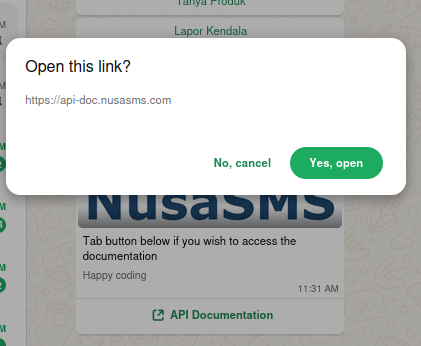
If you wish to send an interactive call-to-action (CTA) URL button, use this Interactive Button URL.
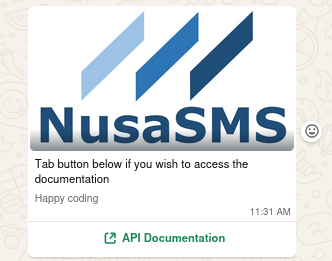
Clicked button
Json Request Components
-
header: Available types:text,document,image, andvideo
optional
Example:text:{"type": "text", "text": "Your Text Header"}document:{"type": "document", "link": "<DOCUMENT URL>"}image:{"type": "image", "link": "<IMAGE URL>"}video:{"type": "video", "link": "<VIDEO URL>"}
Media extensions
document:pdf,doc,docs,ppt,pptx,txt,xlsandxlsximage:jpegandpngimage:3gpandmp4
-
body: Message text body
required, max 1024 characters -
footer: Foot note message
optional, max 60 characters -
button: The URL buttontitle: Button label text
max 20 charactersurl: The URL
Body parameter
{
  "recipient": "string",
  "gateway_id": "string",
  "header": {
    "type": "document",
    "link": "http://example.com",
    "text": "string"
  },
  "body": {
    "text": "string"
  },
  "footer": {
    "text": "string"
  },
  "button": {
    "text": "string",
    "url": "http://example.com"
  }
}
Parameters
| Name | In | Type | Required | Description |
|---|---|---|---|---|
| body | body | URLButtonParameters | true | none |
Example responses
200 Response
{
  "error": false,
  "message": "Data message",
  "data": {
    "message_id": "string"
  }
}
Responses
| Status | Meaning | Description | Schema |
|---|---|---|---|
| 200 | OK | Successful Response | Response |
| 422 | Unprocessable Entity | Validation Error | HTTPValidationError |
Push URL Callback
package main

import (
    "encoding/json"
    "fmt"
    "io"
    "log"
    "net/http"
    "time"
)

// Gateway represents the gateway information in the inbox payload
type Gateway struct {
    ID     string `json:"id"`
    Number string `json:"number"`
}

// Sender represents the sender information in the inbox payload
type Sender struct {
    Number string `json:"number"`
    Name   string `json:"name"`
}

// MessageText represents the text message content
type MessageText struct {
    Body string `json:"body"`
}

// Message represents the message details in the inbox payload
type Message struct {
    Type string      `json:"type"`
    Text MessageText `json:"text,omitempty"`
}

// Status represents the nested status object in the status payload
type Status struct {
    MessageID  string `json:"message_id"`
    Status     string `json:"status"`
    Timestamp  string `json:"timestamp"`
    GatewayID  string `json:"gateway_id,omitempty"`
    Gateway    *Gateway `json:"gateway,omitempty"`
    Recipient  string `json:"recipient,omitempty"`
}

// Inbox represents the inbox payload structure
type Inbox struct {
    MessageID string  `json:"message_id"`
    Timestamp string  `json:"timestamp"`
    Gateway   Gateway `json:"gateway"`
    Sender    Sender  `json:"sender"`
    Message   Message `json:"message"`
}

// WebhookPayload represents the full JSON structure
type WebhookPayload struct {
    Type   string  `json:"type"`
    Status *Status `json:"status,omitempty"`
    Inbox  *Inbox  `json:"inbox,omitempty"`
}

func handleWebhook(w http.ResponseWriter, r *http.Request) {
    // Ensure only POST requests are accepted
    if r.Method != http.MethodPost {
        http.Error(w, "Only POST method is allowed", http.StatusMethodNotAllowed)
        return
    }

    // Limit request body size to prevent potential DoS
    r.Body = http.MaxBytesReader(w, r.Body, 1048576) // 1MB max

    // Read the request body
    body, err := io.ReadAll(r.Body)
    if err != nil {
        http.Error(w, "Error reading request body", http.StatusBadRequest)
        return
    }
    defer r.Body.Close()

    // Parse the JSON
    var payload WebhookPayload
    err = json.Unmarshal(body, &payload)
    if err != nil {
        http.Error(w, fmt.Sprintf("Error parsing JSON: %v", err), http.StatusBadRequest)
        return
    }

    // Process the webhook based on type
    processWebhook(payload)

    // Respond with success
    w.WriteHeader(http.StatusOK)
    w.Write([]byte("Webhook received successfully"))
}

func processWebhook(payload WebhookPayload) {
    fmt.Printf("Received Webhook Type: %s\n", payload.Type)

    switch payload.Type {
    case "status":
        processStatusWebhook(payload.Status)
    case "inbox":
        processInboxWebhook(payload.Inbox)
    default:
        fmt.Printf("Unknown webhook type: %s\n", payload.Type)
    }
}

func processStatusWebhook(status *Status) {
    // Process the data
    return nil
}

func processInboxWebhook(inbox *Inbox) {
    // Process the data
    return nil
}

func main() {
    // Set up routes
    http.HandleFunc("/webhook", handleWebhook)

    // Start the server
    port := 8080
    fmt.Printf("Server starting on port %d...\n", port)
    log.Fatal(http.ListenAndServe(fmt.Sprintf(":%d", port), nil))
}
// webhook.js
const express = require('express');
const app = express();
app.use(express.json());
// -------------------------------------------------
// POST /webhook – accepts both payload types
// -------------------------------------------------
app.post('/webhook', (req, res) => {
const payload = req.body;
// ----- status payload -----
if (payload.type === 'status' && payload.status) {
// Process status data here
return res.json({ result: 'status processed' });
}
// ----- inbox payload -----
if (payload.type === 'inbox' && payload.inbox) {
// Process inbox data here
return res.json({ result: 'inbox processed' });
}
// ----- unknown type -----
res.status(400).json({ error: 'Unsupported payload type' });
});
// Start server
const PORT = process.env.PORT || 3000;
app.listen(PORT, () => {
console.log(`Server listening on http://localhost:${PORT}`);
});<?php
// webhook.php
header('Content-Type: application/json');
// Read raw POST body
$raw = file_get_contents('php://input');
$data = json_decode($raw, true);
if (json_last_error() !== JSON_ERROR_NONE) {
http_response_code(400);
echo json_encode(['error' => 'Invalid JSON']);
exit;
}
// Helper to send a JSON response
function respond(array $payload, int $code = 200): void
{
http_response_code($code);
echo json_encode($payload);
exit;
}
// Status payload
if (isset($data['type']) && $data['type'] === 'status' && isset($data['status'])) {
$status = $data['status'];
// Basic validation (you can expand as needed)
$required = ['message_id', 'status', 'timestamp', 'gateway_id', 'recipient'];
foreach ($required as $field) {
if (!isset($status[$field])) {
respond(['error' => "Missing field $field in status payload"], 400);
}
}
// Process the data here
respond(['result' => 'status processed']);
}
// Inbox payload
if (isset($data['type']) && $data['type'] === 'inbox' && isset($data['inbox'])) {
$inbox = $data['inbox'];
// Required top‑level fields
$requiredTop = ['message_id', 'timestamp', 'gateway', 'sender', 'message'];
foreach ($requiredTop as $field) {
if (!isset($inbox[$field])) {
respond(['error' => "Missing field $field in inbox payload"], 400);
}
}
// Process the data here
respond(['result' => 'inbox processed']);
}
// -----------------------------------------------------------------
// If we reach here, the payload type is unsupported
// -----------------------------------------------------------------
respond(['error' => 'Unsupported payload type'], 400);
?># app.py
from fastapi import FastAPI, HTTPException
from pydantic import BaseModel, Field
from typing import Literal, Union
app = FastAPI()
class Payload(BaseModel):
type: Literal["inbox", "status"]
inbox: dict | None
status: dict | None
# ---------- Endpoints ----------
@app.post("/webhook")
async def receive_payload(payload: Payload):
"""
Accepts either a `status` or an `inbox` payload.
"""
if payload.type == 'inbox':
# Process the data here
return {"result": "inbox processed"}
elif payload.type == 'status'
# Process the data here
return {"result": "status processed"}
raise HTTPException(status_code=400, detail="Unsupported payload type")# webhook.rb
require 'sinatra'
require 'json'
set :port, 4567 # change if you need a different port
set :bind, '0.0.0.0'
helpers do
# tiny helper to check required keys
def has_keys?(hash, keys)
keys.all? { |k| hash.key?(k) }
end
end
post '/webhook' do
request.body.rewind
raw = request.body.read
begin
payload = JSON.parse(raw)
rescue JSON::ParserError
halt 400, { error: 'Invalid JSON' }.to_json
end
# ---------- status payload ----------
if payload['type'] == 'status' && payload['status']
status = payload['status']
# Process status data
{ result: 'status processed' }.to_json
# ---------- inbox payload ----------
elsif payload['type'] == 'inbox' && payload['inbox']
inbox = payload['inbox']
# Process inbox data
{ result: 'inbox processed' }.to_json
else
halt 400, { error: 'Unsupported payload type' }.to_json
end
end
Delivery status and Inbox data can be retrieved by setting your Callback URL. Callback URL setting can be set in Account > Account Settings > WhatsApp Business Webhook menu on app.nusasms.com.
Callback URL will be called with HTTP POST method with json content type.
Delivery Status
Delivery status is status changes of your messages. The avaiable status is
submittedsentdeliveredreadfailed
JSON Callback Example
{
  "type": "status",
  "status": {
    "message_id": "MESSAGE_ID",
    "status": "read",
    "timestamp": 1766125960,
    "gateway_id": "GATEWAY_ID",
    "recipient": "628xxxxxxx"
  }
}
Inbox
Inbox data is the message that received to your gateway from any other Whatsapp account (sender).
The message payload is the data that has been received by the gateway.
{
  "type": "inbox",
  "inbox": {
    "message_id": "MESSAGE_ID",
    "timestamp": "1766124507",
    "gateway": {
      "id": "GATEWAY_ID",
      "number": "628xxxxxxx"
    },
    "sender": {
      "number": "628yyyyyyyyy",
      "name": "Nama Akun Whatsapp Sender"
    },
    "message": {
      "type": "text",
      "text": {
        "body": "Teks inbox"
      }
    }
  }
}
Changelog
2026-04-23
Added
- Send Interactive Button Reply documentation
- Send Interactive Button URL documentation
2026-04-15
Updated
- More
wa_business/replymessage types
2026-04-15
Added
- Add Send Interactive Button List documentation
2026-02-24
Updated
- IP Whitelist validation applied
2025-04-29
- Add more detail about header types and its max size
2024-12-20
- Update on API parameter. Use
templateparameter now.
2023-09-15
Added
- ✨ New parameter,
include_unsubscribeto allow client’s recipient to exclude their account from client’s messages
2023-07-12
Added
- ✨ New endpoint for WA Business
/wa_business/otp
2023-03-03
Added
- ✨ New API, Whatsapp Business. Send Whatsapp message using official Meta partner.
v1
Added
- SMS API Documentations
Schemas
Button
{
  "sub_type": "QUICK_REPLY",
  "parameters": {
    "type": "payload",
    "payload": "string"
  },
  "index": 2
}
Button
Properties
| Name | Type | Required | Restrictions | Description |
|---|---|---|---|---|
| sub_type | string | false | none | none |
| parameters | ButtonParameter | true | none | none |
| index | integer | true | none | none |
Enumerated Values
| Property | Value |
|---|---|
| sub_type | QUICK_REPLY |
| sub_type | URL |
ButtonActionButtonList
{
  "text": "string",
  "sections": [
    {
      "title": "string",
      "rows": [
        {
          "button_id": "string",
          "title": "string",
          "description": "string"
        }
      ]
    }
  ]
}
ButtonActionButtonList
Properties
| Name | Type | Required | Restrictions | Description |
|---|---|---|---|---|
| text | string | true | none | none |
| sections | [ButtonSection] | true | none | none |
ButtonParameter
{
  "type": "payload",
  "payload": "string"
}
ButtonParameter
Properties
| Name | Type | Required | Restrictions | Description |
|---|---|---|---|---|
| type | string | false | none | none |
| payload | string | false | none | none |
Enumerated Values
| Property | Value |
|---|---|
| type | payload |
ButtonSection
{
  "title": "string",
  "rows": [
    {
      "button_id": "string",
      "title": "string",
      "description": "string"
    }
  ]
}
ButtonSection
Properties
| Name | Type | Required | Restrictions | Description |
|---|---|---|---|---|
| title | string | true | none | none |
| rows | [ButtonSectionItem] | true | none | none |
ButtonSectionItem
{
  "button_id": "string",
  "title": "string",
  "description": "string"
}
ButtonSectionItem
Properties
| Name | Type | Required | Restrictions | Description |
|---|---|---|---|---|
| button_id | string | true | none | none |
| title | string | true | none | none |
| description | string | false | none | none |
Document
{
  "type": "document",
  "link": "http://example.com",
  "filename": "string"
}
Document
Properties
| Name | Type | Required | Restrictions | Description |
|---|---|---|---|---|
| type | string | true | none | none |
| link | string(uri) | true | none | none |
| filename | string | false | none | none |
Enumerated Values
| Property | Value |
|---|---|
| type | document |
HTTPValidationError
{
  "detail": [
    {
      "loc": [
        "string"
      ],
      "msg": "string",
      "type": "string"
    }
  ]
}
HTTPValidationError
Properties
| Name | Type | Required | Restrictions | Description |
|---|---|---|---|---|
| detail | [ValidationError] | false | none | none |
Image
{
  "type": "image",
  "link": "http://example.com",
  "filename": "string"
}
Image
Properties
| Name | Type | Required | Restrictions | Description |
|---|---|---|---|---|
| type | string | true | none | none |
| link | string(uri) | true | none | none |
| filename | string | false | none | none |
Enumerated Values
| Property | Value |
|---|---|
| type | image |
InteractiveBody
{
  "text": "string"
}
InteractiveBody
Properties
| Name | Type | Required | Restrictions | Description |
|---|---|---|---|---|
| text | string | false | none | none |
InteractiveFooter
{
  "text": "string"
}
InteractiveFooter
Properties
| Name | Type | Required | Restrictions | Description |
|---|---|---|---|---|
| text | string | true | none | none |
InteractiveHeaderButton
{
  "type": "document",
  "link": "http://example.com",
  "text": "string"
}
InteractiveHeaderButton
Properties
| Name | Type | Required | Restrictions | Description |
|---|---|---|---|---|
| type | string | true | none | none |
| link | string(uri) | false | none | none |
| text | string | false | none | none |
Enumerated Values
| Property | Value |
|---|---|
| type | document |
| type | image |
| type | text |
| type | video |
InteractiveHeaderReplyButton
{
  "type": "document",
  "link": "http://example.com",
  "text": "string"
}
InteractiveHeaderReplyButton
Properties
| Name | Type | Required | Restrictions | Description |
|---|---|---|---|---|
| type | string | true | none | none |
| link | string(uri) | false | none | none |
| text | string | false | none | none |
Enumerated Values
| Property | Value |
|---|---|
| type | document |
| type | image |
| type | text |
| type | video |
InteractiveHeaderTextOnly
{
  "text": "string"
}
InteractiveHeaderTextOnly
Properties
| Name | Type | Required | Restrictions | Description |
|---|---|---|---|---|
| text | string | true | none | none |
ListButtonsParameters
{
  "recipient": "string",
  "gateway_id": "string",
  "header": {
    "text": "string"
  },
  "body": {
    "text": "string"
  },
  "footer": {
    "text": "string"
  },
  "action": {
    "text": "string",
    "sections": [
      {
        "title": "string",
        "rows": [
          {
            "button_id": "string",
            "title": "string",
            "description": "string"
          }
        ]
      }
    ]
  }
}
ListButtonsParameters
Properties
| Name | Type | Required | Restrictions | Description |
|---|---|---|---|---|
| recipient | string | true | none | none |
| gateway_id | string | true | none | none |
| header | InteractiveHeaderTextOnly | false | none | none |
| body | InteractiveBody | true | none | none |
| footer | InteractiveFooter | false | none | none |
| action | ButtonActionButtonList | true | none | none |
OTPParameter
{
  "recipient": "string",
  "gateway_id": "string",
  "otp": "string",
  "template": {
    "name": "string",
    "language": "string"
  }
}
OTPParameter
Properties
| Name | Type | Required | Restrictions | Description |
|---|---|---|---|---|
| recipient | string | true | none | none |
| gateway_id | string | true | none | none |
| otp | string | true | none | none |
| template | Template | true | none | none |
PayloadMedia
{
  "id": "string",
  "link": "http://example.com",
  "caption": "string"
}
PayloadMedia
Properties
| Name | Type | Required | Restrictions | Description |
|---|---|---|---|---|
| id | string | false | none | none |
| link | string(uri) | false | none | none |
| caption | string | false | none | none |
PayloadMediaDocument
{
  "id": "string",
  "link": "http://example.com",
  "caption": "string",
  "filename": "string"
}
PayloadMediaDocument
Properties
| Name | Type | Required | Restrictions | Description |
|---|---|---|---|---|
| id | string | false | none | none |
| link | string(uri) | false | none | none |
| caption | string | false | none | none |
| filename | string | false | none | none |
PayloadText
{
  "body": "string"
}
PayloadText
Properties
| Name | Type | Required | Restrictions | Description |
|---|---|---|---|---|
| body | string | true | none | none |
Person
{
  "userid": "string",
  "idPerson": 0,
  "idClient": 0
}
Person
Properties
| Name | Type | Required | Restrictions | Description |
|---|---|---|---|---|
| userid | string | true | none | none |
| idPerson | integer | true | none | none |
| idClient | integer | true | none | none |
PersonResponse
{
  "error": false,
  "message": "Data message",
  "data": {
    "userid": "string",
    "idPerson": 0,
    "idClient": 0
  }
}
PersonResponse
Properties
| Name | Type | Required | Restrictions | Description |
|---|---|---|---|---|
| error | boolean | false | none | none |
| message | string | false | none | none |
| data | Person | true | none | none |
ReplyButtonBody
{
  "text": "string"
}
ReplyButtonBody
Properties
| Name | Type | Required | Restrictions | Description |
|---|---|---|---|---|
| text | string | false | none | none |
ReplyButtonButton
{
  "button_id": "string",
  "title": "string"
}
ReplyButtonButton
Properties
| Name | Type | Required | Restrictions | Description |
|---|---|---|---|---|
| button_id | string | true | none | none |
| title | string | true | none | none |
ReplyButtonParameters
{
  "recipient": "string",
  "gateway_id": "string",
  "header": {
    "type": "document",
    "link": "http://example.com",
    "text": "string"
  },
  "body": {
    "text": "string"
  },
  "footer": {
    "text": "string"
  },
  "buttons": [
    {
      "button_id": "string",
      "title": "string"
    }
  ]
}
ReplyButtonParameters
Properties
| Name | Type | Required | Restrictions | Description |
|---|---|---|---|---|
| recipient | string | true | none | none |
| gateway_id | string | true | none | none |
| header | InteractiveHeaderReplyButton | false | none | none |
| body | ReplyButtonBody | true | none | none |
| footer | InteractiveFooter | false | none | none |
| buttons | [ReplyButtonButton] | true | none | none |
ReplyDocumentParameter
{
  "recipient": "string",
  "gateway_id": "string",
  "type": "document",
  "payloads": {
    "id": "string",
    "link": "http://example.com",
    "caption": "string",
    "filename": "string"
  }
}
ReplyDocumentParameter
Properties
| Name | Type | Required | Restrictions | Description |
|---|---|---|---|---|
| recipient | string | true | none | none |
| gateway_id | string | true | none | none |
| type | string | true | none | none |
| payloads | PayloadMediaDocument | true | none | none |
Enumerated Values
| Property | Value |
|---|---|
| type | document |
ReplyMediaParameter
{
  "recipient": "string",
  "gateway_id": "string",
  "type": "image",
  "payloads": {
    "id": "string",
    "link": "http://example.com",
    "caption": "string"
  }
}
ReplyMediaParameter
Properties
| Name | Type | Required | Restrictions | Description |
|---|---|---|---|---|
| recipient | string | true | none | none |
| gateway_id | string | true | none | none |
| type | string | true | none | none |
| payloads | PayloadMedia | true | none | none |
Enumerated Values
| Property | Value |
|---|---|
| type | image |
| type | video |
ReplyTextParameter
{
  "recipient": "string",
  "gateway_id": "string",
  "type": "text",
  "payloads": {
    "body": "string"
  }
}
ReplyTextParameter
Properties
| Name | Type | Required | Restrictions | Description |
|---|---|---|---|---|
| recipient | string | true | none | none |
| gateway_id | string | true | none | none |
| type | string | true | none | none |
| payloads | PayloadText | true | none | none |
Enumerated Values
| Property | Value |
|---|---|
| type | text |
Response
{
  "error": false,
  "message": "Data message",
  "data": {
    "message_id": "string"
  }
}
Response
Properties
| Name | Type | Required | Restrictions | Description |
|---|---|---|---|---|
| error | boolean | false | none | none |
| message | string | false | none | none |
| data | ResponseData | true | none | none |
ResponseData
{
  "message_id": "string"
}
ResponseData
Properties
| Name | Type | Required | Restrictions | Description |
|---|---|---|---|---|
| message_id | string | false | none | none |
Template
{
  "name": "string",
  "language": "string"
}
Template
Properties
| Name | Type | Required | Restrictions | Description |
|---|---|---|---|---|
| name | string | true | none | none |
| language | string | true | none | none |
TemplateParam
{
  "recipient": "string",
  "gateway_id": "string",
  "template": {
    "name": "string",
    "language": "string"
  },
  "header": {
    "type": "image",
    "link": "http://example.com",
    "filename": "string"
  },
  "body": [
    {
      "type": "text",
      "text": "string"
    }
  ],
  "buttons": [
    {
      "sub_type": "QUICK_REPLY",
      "parameters": {
        "type": "payload",
        "payload": "string"
      },
      "index": 2
    }
  ],
  "message_id": "string"
}
TemplateParam
Properties
| Name | Type | Required | Restrictions | Description |
|---|---|---|---|---|
| recipient | string | true | none | none |
| gateway_id | string | true | none | none |
| template | Template | true | none | none |
| header | any | false | none | none |
anyOf
| Name | Type | Required | Restrictions | Description |
|---|---|---|---|---|
| » anonymous | Image | false | none | none |
or
| Name | Type | Required | Restrictions | Description |
|---|---|---|---|---|
| » anonymous | Document | false | none | none |
or
| Name | Type | Required | Restrictions | Description |
|---|---|---|---|---|
| » anonymous | Video | false | none | none |
or
| Name | Type | Required | Restrictions | Description |
|---|---|---|---|---|
| » anonymous | [Text] | false | none | none |
continued
| Name | Type | Required | Restrictions | Description |
|---|---|---|---|---|
| body | [Text] | false | none | none |
| buttons | [Button] | false | none | none |
| message_id | string | false | none | none |
Text
{
  "type": "text",
  "text": "string"
}
Text
Properties
| Name | Type | Required | Restrictions | Description |
|---|---|---|---|---|
| type | string | true | none | none |
| text | string | true | none | none |
Enumerated Values
| Property | Value |
|---|---|
| type | text |
URLButton
{
  "text": "string",
  "url": "http://example.com"
}
URLButton
Properties
| Name | Type | Required | Restrictions | Description |
|---|---|---|---|---|
| text | string | true | none | none |
| url | string(uri) | true | none | none |
URLButtonParameters
{
  "recipient": "string",
  "gateway_id": "string",
  "header": {
    "type": "document",
    "link": "http://example.com",
    "text": "string"
  },
  "body": {
    "text": "string"
  },
  "footer": {
    "text": "string"
  },
  "button": {
    "text": "string",
    "url": "http://example.com"
  }
}
URLButtonParameters
Properties
| Name | Type | Required | Restrictions | Description |
|---|---|---|---|---|
| recipient | string | true | none | none |
| gateway_id | string | true | none | none |
| header | InteractiveHeaderButton | false | none | none |
| body | ReplyButtonBody | true | none | none |
| footer | InteractiveFooter | false | none | none |
| button | URLButton | true | none | none |
ValidationError
{
  "loc": [
    "string"
  ],
  "msg": "string",
  "type": "string"
}
ValidationError
Properties
| Name | Type | Required | Restrictions | Description |
|---|---|---|---|---|
| loc | [anyOf] | true | none | none |
anyOf
| Name | Type | Required | Restrictions | Description |
|---|---|---|---|---|
| » anonymous | string | false | none | none |
or
| Name | Type | Required | Restrictions | Description |
|---|---|---|---|---|
| » anonymous | integer | false | none | none |
continued
| Name | Type | Required | Restrictions | Description |
|---|---|---|---|---|
| msg | string | true | none | none |
| type | string | true | none | none |
Video
{
  "type": "video",
  "link": "http://example.com",
  "filename": "string"
}
Video
Properties
| Name | Type | Required | Restrictions | Description |
|---|---|---|---|---|
| type | string | true | none | none |
| link | string(uri) | true | none | none |
| filename | string | false | none | none |
Enumerated Values
| Property | Value |
|---|---|
| type | video |